Keep curriculum packs structured enough to use in real lesson planning.
Curriculum support works best when the structure survives import. Planlark’s curriculum library keeps outcome trees, sub-outcomes, granular list items, guiding-question support where the source provides it, and official resource links. Teachers can attach curriculum to classes, save reusable outcome banks, and select specific child list items inside lessons instead of being forced to attach only one long flattened standard.
What the AI can do
AI can use structured curriculum packs and granular outcome items when linking lessons, checking coverage, and building units.
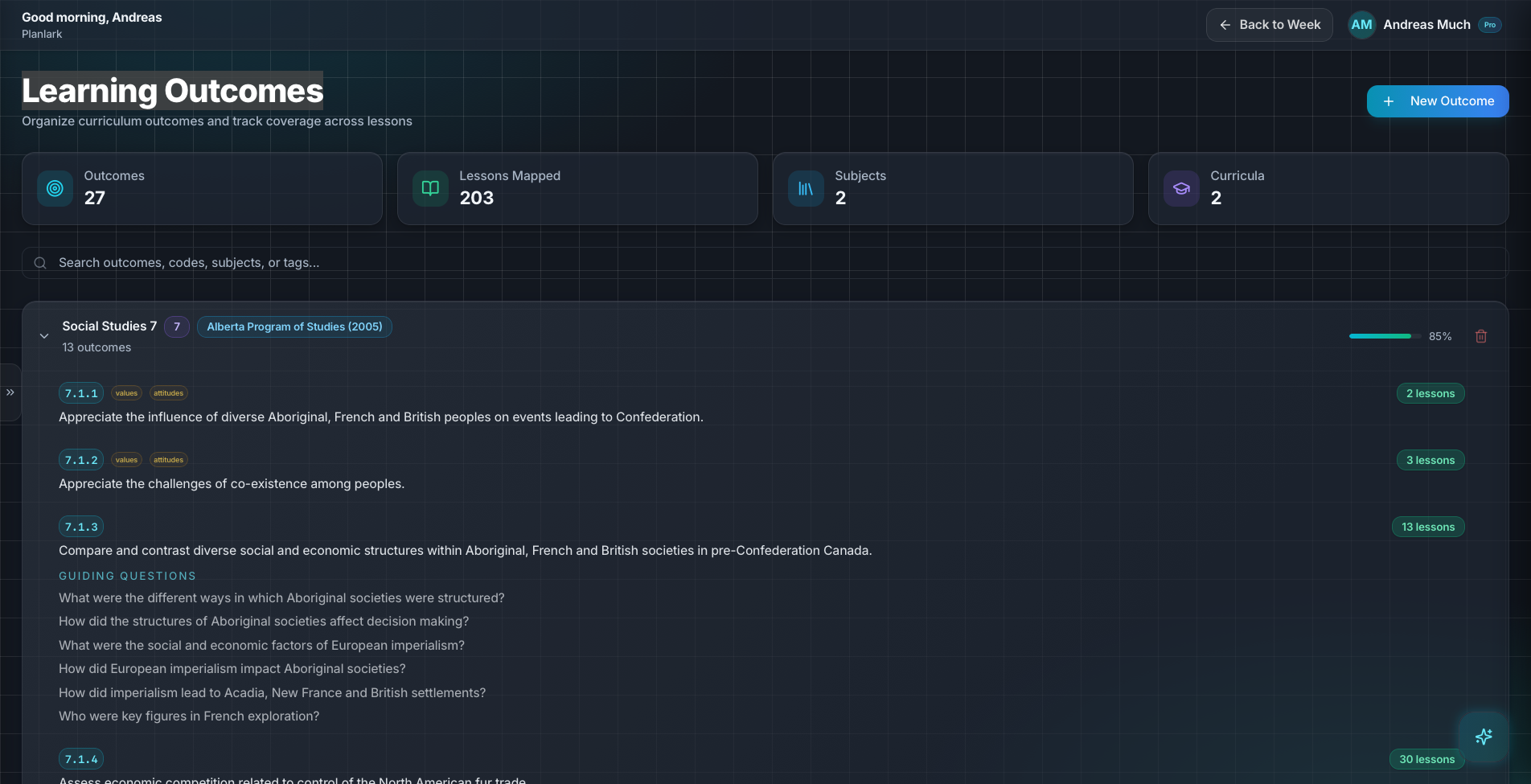
Outcome structure is preserved so teachers can choose the exact curriculum target they are teaching.
Context aware
Connected to the weekly planner, schedule rules, and unit structure.
Teacher controlled
You review and refine changes instead of handing the whole process away.
Built for school reality
Designed around shifting timetables, real curriculum work, and mid-week edits.
Where Curriculum Library fits into the planning week.
Import and manage curriculum packs with nested outcomes, sub-outcomes, list items, and official resource links.
Attach curriculum to a class once, reuse saved outcome banks on future lessons, and keep coverage visible across the planner.
Select precise child list items when a single curriculum statement contains multiple teachable targets.
Real reasons teachers reach for this feature.
Class-level curriculum setup
Attach the right curriculum pack to a class and let teachers reuse that bank on future lessons instead of searching from scratch each time.
Granular lesson matching
Choose one specific list item from a larger outcome when only part of the standard is being taught in the lesson.
Curriculum resource access
Open the official linked resource from the curriculum pack while planning the lesson or unit.
What it looks like when a teacher actually uses it.
These example prompts and outcomes show the kind of planning work this feature is designed to handle.
Prompt
"Attach the Alberta Grade 7 Social Studies curriculum pack to this class and add just the Confederation list item to tomorrow's lesson."
Outcome
Planlark links the class to the curriculum bank, exposes the granular outcome items, and attaches the selected lesson outcome with parent context preserved.
Prompt
"Show me the Alberta outcomes we still have not covered in this unit."
Outcome
The library and coverage view surface the remaining outcome targets and relevant linked resources.
Prompt
"Save these French list-item outcomes to the class for reuse next week."
Outcome
Planlark adds them to the class-level bank so they can be applied faster on future lessons.
Keep exploring the planning workflow.
Related help
Learn how to use this in the product.
Curriculum
How to import curriculum and outcomes in Planlark
Paste curriculum text or ask Lark to import a framework, then review sub-outcomes, guiding questions, QA warnings, and shared-library approval before planning from it.
Read help guideUnit Planning
How to build units and lesson sequences in Planlark
Use the Unit Planner to create a unit, add source material, generate lesson sequences on real dates, and keep outcomes tied to the plan.
Read help guideAI
How to use Lark inside Planlark
Use Lark by text or voice to create, edit, delete, reschedule, and explain planning work across lessons, units, outcomes, and assessments.
Read help guideRelated features
Keep exploring the workflow.
Curriculum
Outcome Auto-Linking
Connect learning outcomes to units and lessons automatically from IDs, codes, subject filters, or the lesson brief itself.
Read feature pageDaily Planning
AI Day Planning
Planlark fills before-school, lunch, and after-school windows with the right work using your actual teaching schedule.
Read feature pageArtifacts
Artifacts Workspace
Create worksheets, assessments, readings, study guides, vocabulary work, rubrics, and handouts in a centralized artifacts workspace backed by Google Docs.
Read feature pageEarly access
Try Curriculum Library inside the full planner
Join the waitlist to see how Planlark connects weekly planning, AI actions, schedule logic, and curriculum tracking.
No credit card required. Early access updates only.