PlanLark
Features

Everything you need to plan your teaching. Together.

Curriculum, units, lessons, classes, assessments, tasks, projects and teaching notes — connected, so the work you do in one place shows up in the others.

Curriculum planning

Curriculum you can plan against

Adopt a curriculum from the library, choose what each class covers this year, and let coverage build itself as you plan and teach.
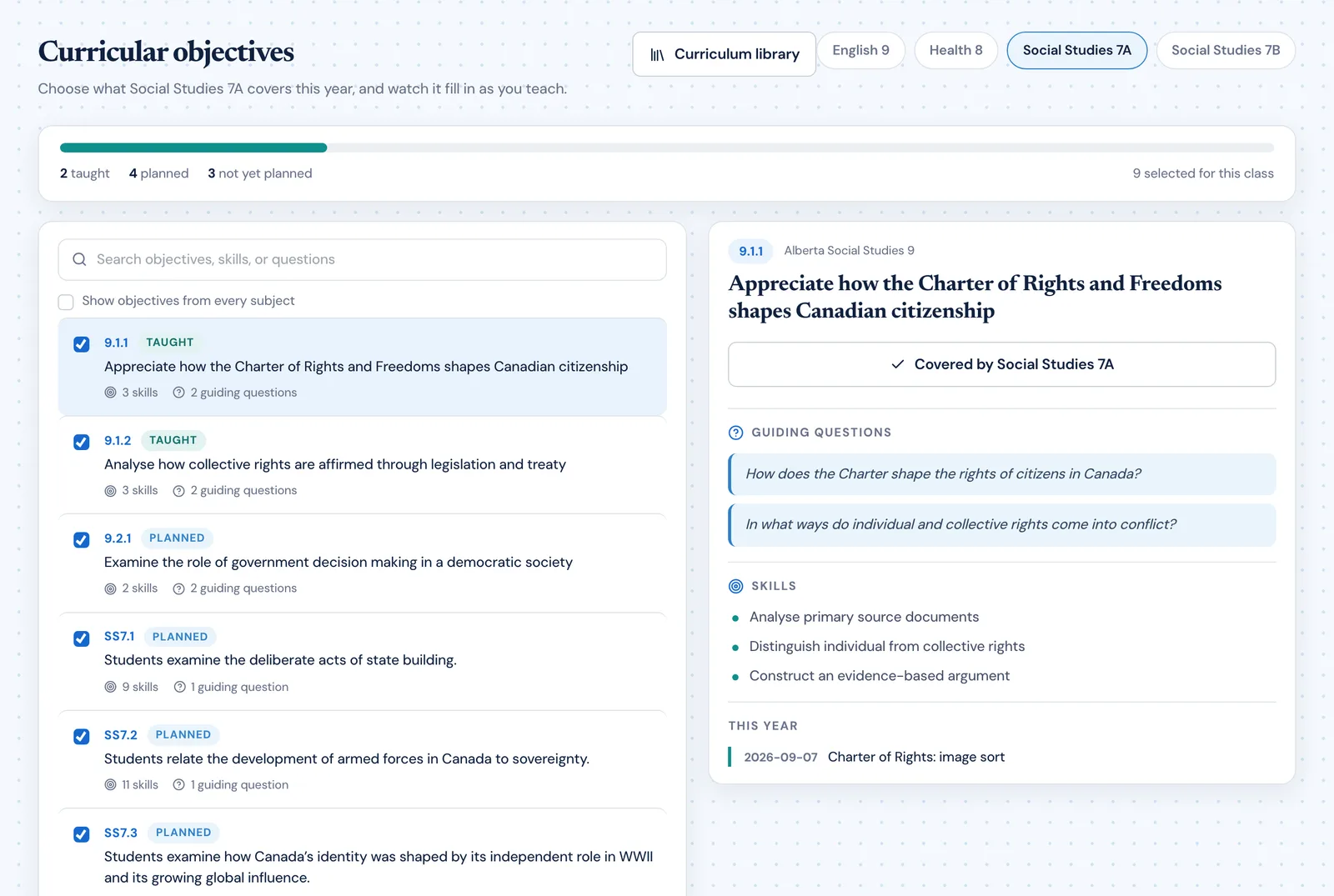
PlanLark curricular objectives for Social Studies 7A: a coverage bar reading two taught, four planned and three not yet planned, a searchable objective list, and one objective open showing its guiding questions and skills
Curriculum library
Find a curriculum by jurisdiction, check its source, and add it to your workspace.
Per-class selection
Each class carries its own set of objectives for the year, so two sections of the same course can differ.
Objectives in full
Every objective keeps its code, guiding questions, skills and strands — not just a line of text.
Coverage at a glance
A single bar shows how many objectives are taught, planned, and not yet planned.
Attached to lessons
Add a guiding question, a learning outcome, or individual knowledge, understanding and skill statements to a lesson.
Traceable
Open an objective and see which lessons this year teach it, and when.
Unit planning

Units that hold their own lessons

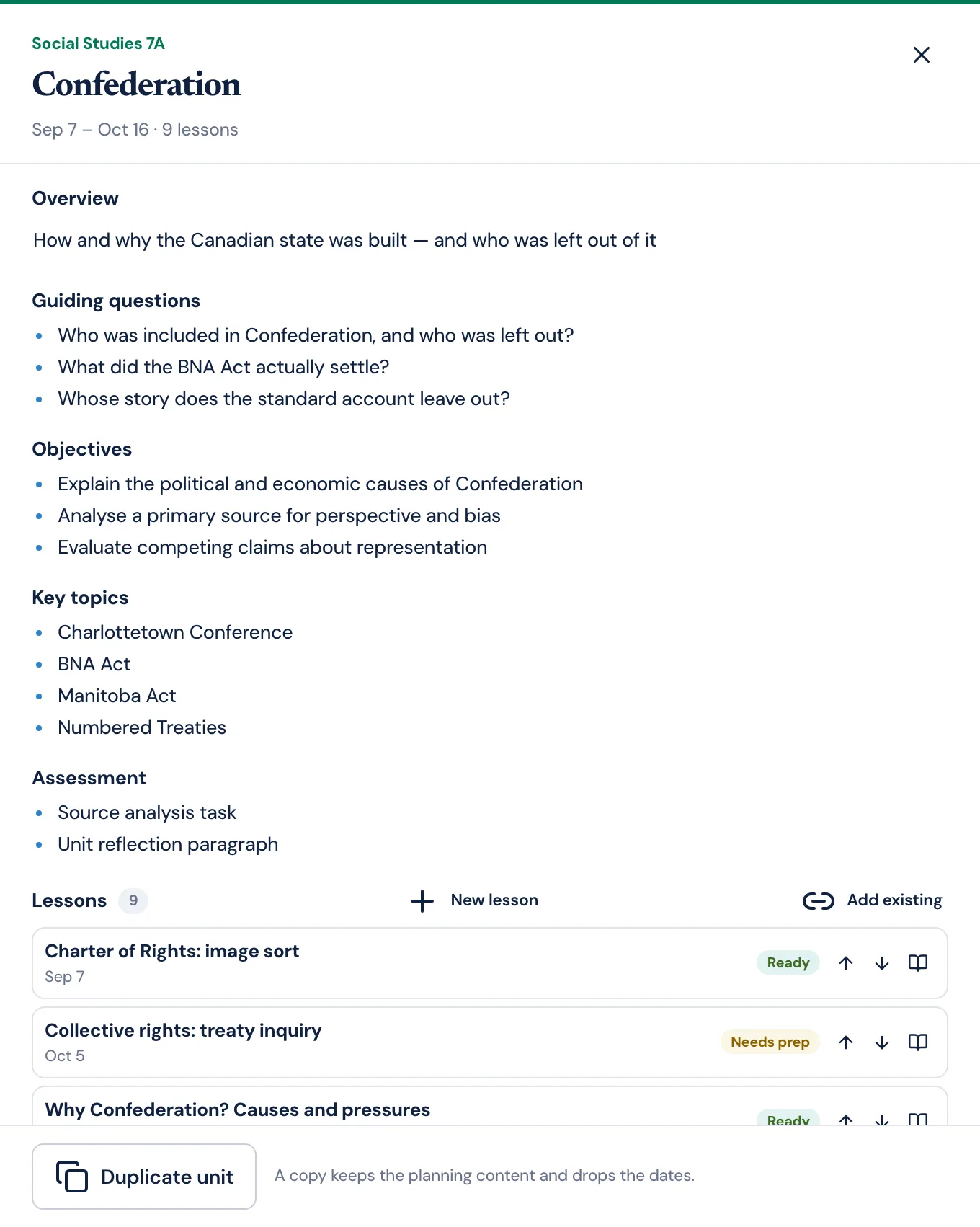
A unit is a workspace: its thinking on one side, the lessons that deliver it on the other, in teaching order.

The PlanLark unit workspace for Confederation showing its overview, three guiding questions, objectives, key topics, assessment list, and its lessons with preparation badges and reorder controls
Unit workspace
Overview, guiding questions, objectives, key topics, assessment and notes, all editable in place.
Lessons in order
The unit lists its lessons in the sequence you set, or by the date they are taught.
Reorder and move
Move a lesson up or down the sequence, or move it to another unit entirely.
Add existing lessons
Pull a lesson you have already planned into a unit — the same lesson, not a copy.
Plan a new lesson in place
Start a lesson on the next unplanned meeting inside the unit’s dates.
Duplicate for next year
A copy keeps the planning content and drops the dates, ready to schedule fresh.
Lesson planning

The plan, the day it belongs to

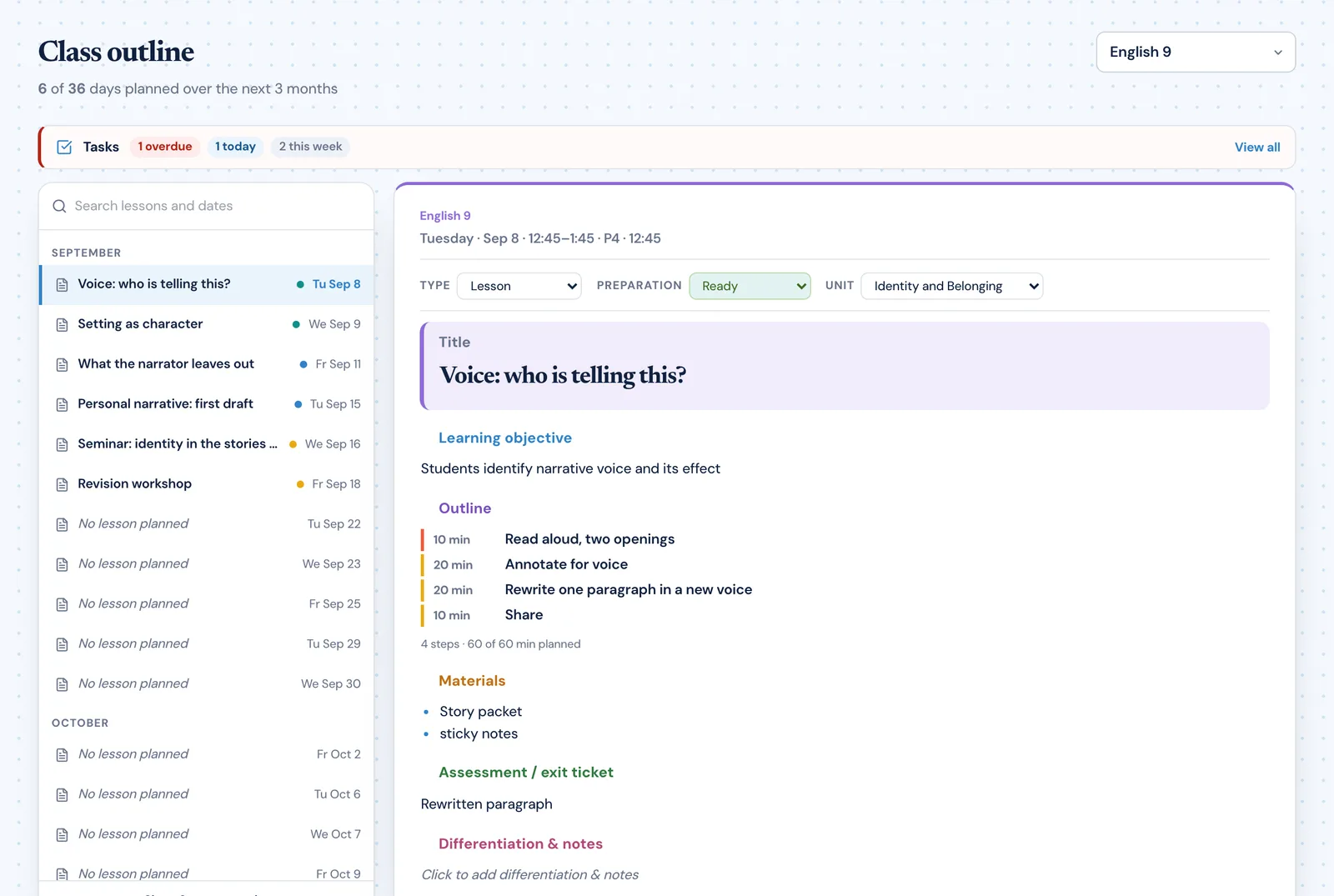
Choose a class and every date it meets is listed by month. Select one and the lesson renders as a finished page you can edit by clicking into it.

The PlanLark class outline for English 9 with September dates down the left and the lesson for Tuesday September 8 shown as a finished plan with type, preparation status, unit, learning objective, timed outline and materials
Class outline
Every meeting date for a class, grouped by month, with the lesson planned for it or “No lesson planned”.
Edit in place
Click a section and it becomes an editable box with bold, italic, bullets and numbering. Click away and it is a printed plan again.
Timed outline
One step per line with its minutes, totalled against the length of your period.
Lesson type
Mark an entry as a lesson, activity, assignment, project, quiz, assessment, review or field trip.
Preparation status
Needs prep, in progress, or ready — visible in the outline and on the unit.
Reorder sections
Drag a section by its heading to put the plan in the order you teach it.
Paste a lesson in
Paste an existing plan and PlanLark reads the headings and fills the fields. English and German headings are both understood.
Related tasks and notes
The prep task and the note about last time sit with the lesson, not in another app.
Duplicate and reuse
Copy a lesson into your library, keeping its content and unit, ready to place on another day.
Planning calendar

Today, this week, this year

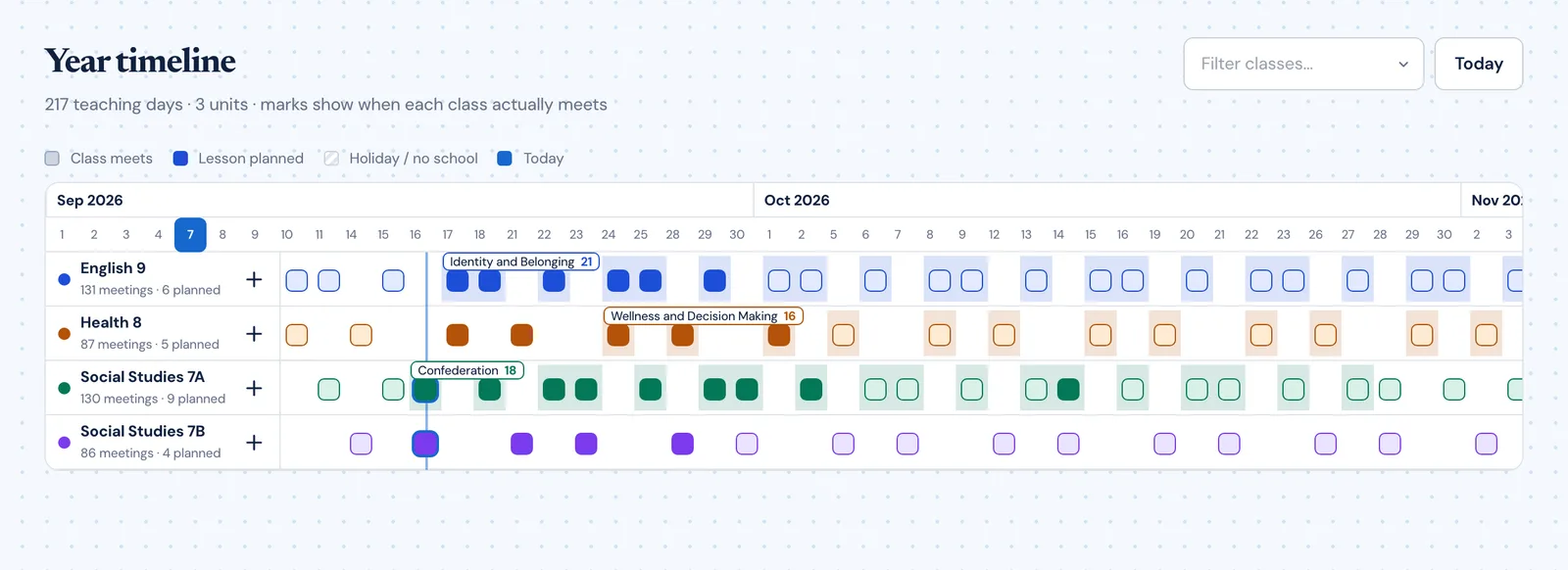
Three views of the same plan, at the three distances teachers actually work at.

The PlanLark year timeline showing four classes as rows with unit bands and marks on the days each class meets
Today
The teaching day as a timeline — classes, supervision duties and events — with the lesson for the class you select beside it.
A suggested next move
A plain, rule-based prompt: the overdue task, or the class starting soon with nothing planned.
Side rail
Notifications, tasks, projects and notes in the space beside the day.
Week
The real timetable, period by period, across the teaching week.
Year
Units as bands across the dates each class actually meets, adjustable one meeting at a time.
Rotating schedules
Cycle days, holidays and non-teaching days, so lessons land on real class dates.
Tasks and projects

One system, not two lists

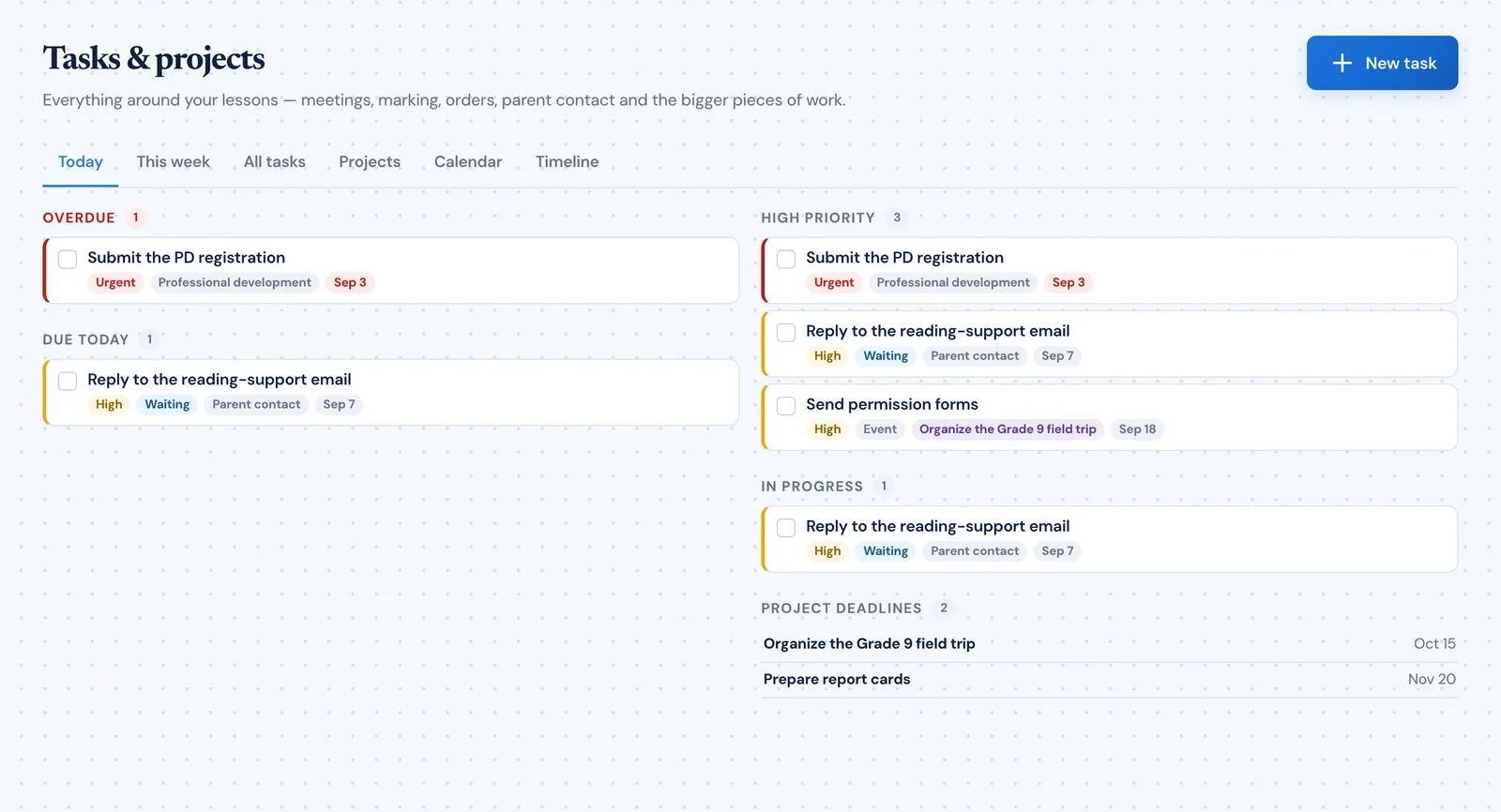
A task inside a project is the same record as a standalone task. Projects contain their tasks rather than copying them.

The PlanLark task manager listing teacher tasks with priorities, due dates and categories
Tasks
Status, priority, category, due date and the class or lesson a task belongs to.
Projects
Longer pieces of work — a field trip, a report cycle — with a deadline and their own tasks.
Projects contain tasks
Add an existing task to a project, remove it without deleting it, or move it between projects.
Progress
A project shows real progress from the state of the tasks it holds.
Views for the day
Today and This week answer what is actually due; All, Projects, Calendar and Timeline cover the rest.
Lesson preparation tasks
Add a prep task from the lesson it is for, and see it on the lesson next time you open it.
Teaching notes

Planning and reflection notes that stay attached

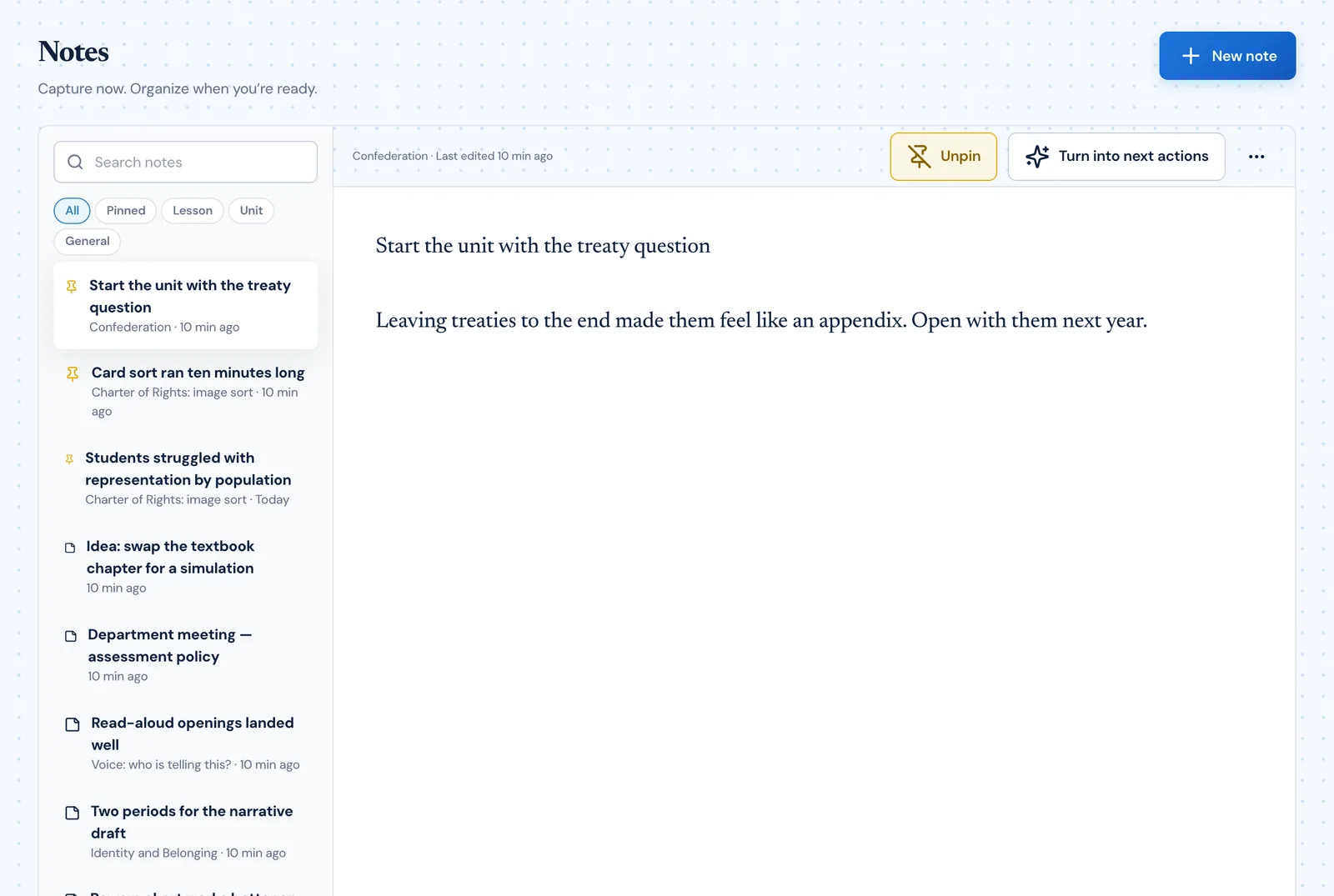
These are your notes about teaching — what to change next time, what to remember, what the department decided. One system, shown wherever the note belongs.

The PlanLark Notes view with All, Pinned, Lesson, Unit and General filters, a searchable list of teacher notes, and one note open in the editor
Quick capture
Write a note from anywhere in the planner without leaving what you were doing.
General notes
A note that belongs to nothing in particular is still a note, and stays exactly that.
Lesson notes
A note written on a lesson shows on that lesson — and on the unit the lesson belongs to.
Unit notes
Notes about the unit as a whole sit in the unit workspace.
Pin what matters
Pinned notes come first wherever they appear.
Search and filter
Filter by pinned, lesson, unit or general, and search the full text of every note.
Unlink without losing
Take a note off a lesson and it stays a note — still attached to its unit and class.
Assessments

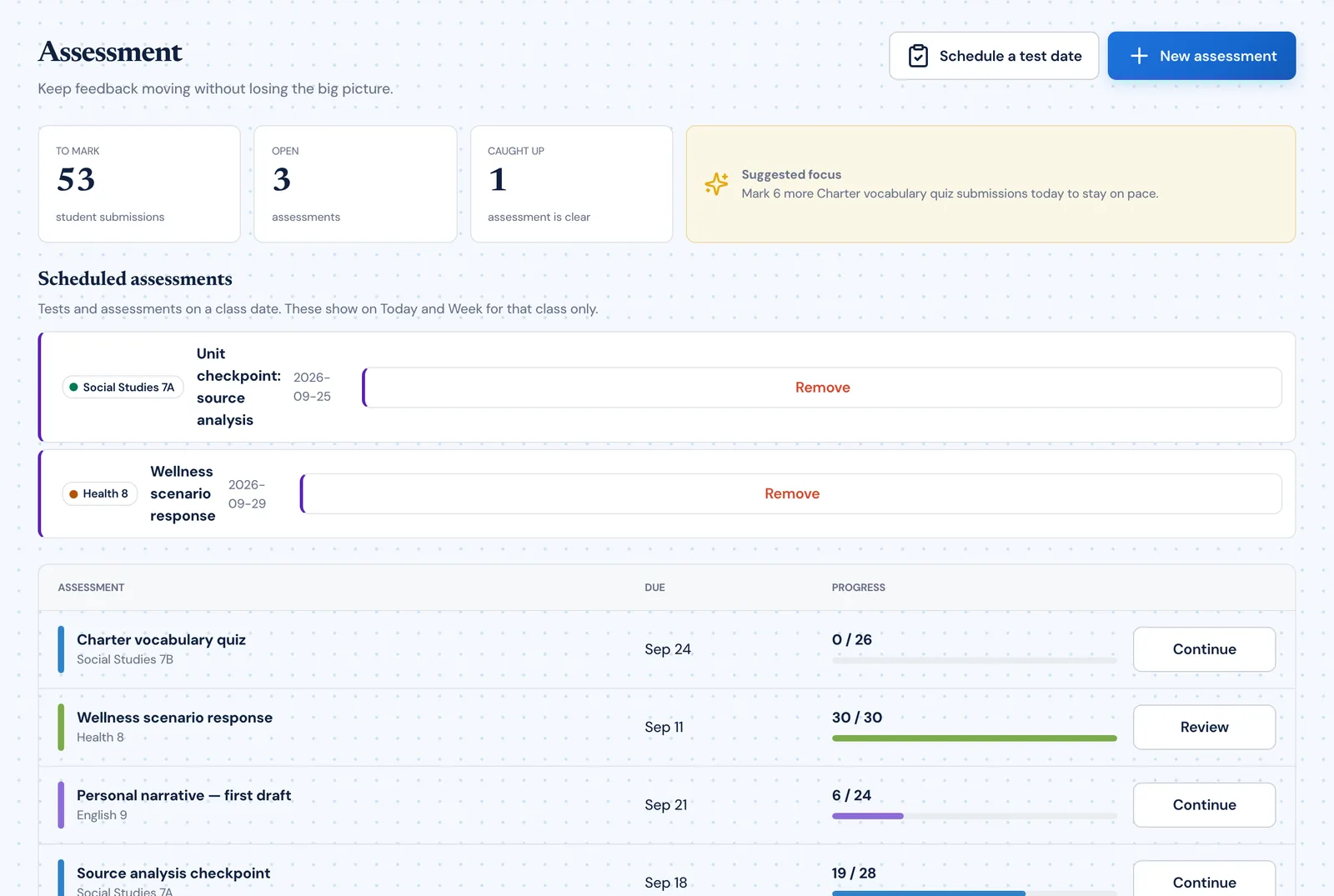
Test dates on the calendar, marking you can see the end of

Two practical things: knowing when the assessments are, and knowing how much marking is left.

The PlanLark assessments view showing submissions to mark, open assessments, scheduled test dates and per-assessment marking progress
Schedule a test date
Put an assessment on a real class date so it appears on Today and Week for that class.
Track marking progress
Record expected submissions and how many are marked, and watch the number come down.
Marking overview
How many submissions are waiting, how many assessments are open, and how many are clear.
From the lesson
Schedule an assessment for a meeting from the lesson editor for that day.

Scheduling test dates is on every plan. Marking progress tracking is part of Pro and School. See plans

Classes and timetable

Your timetable, entered once

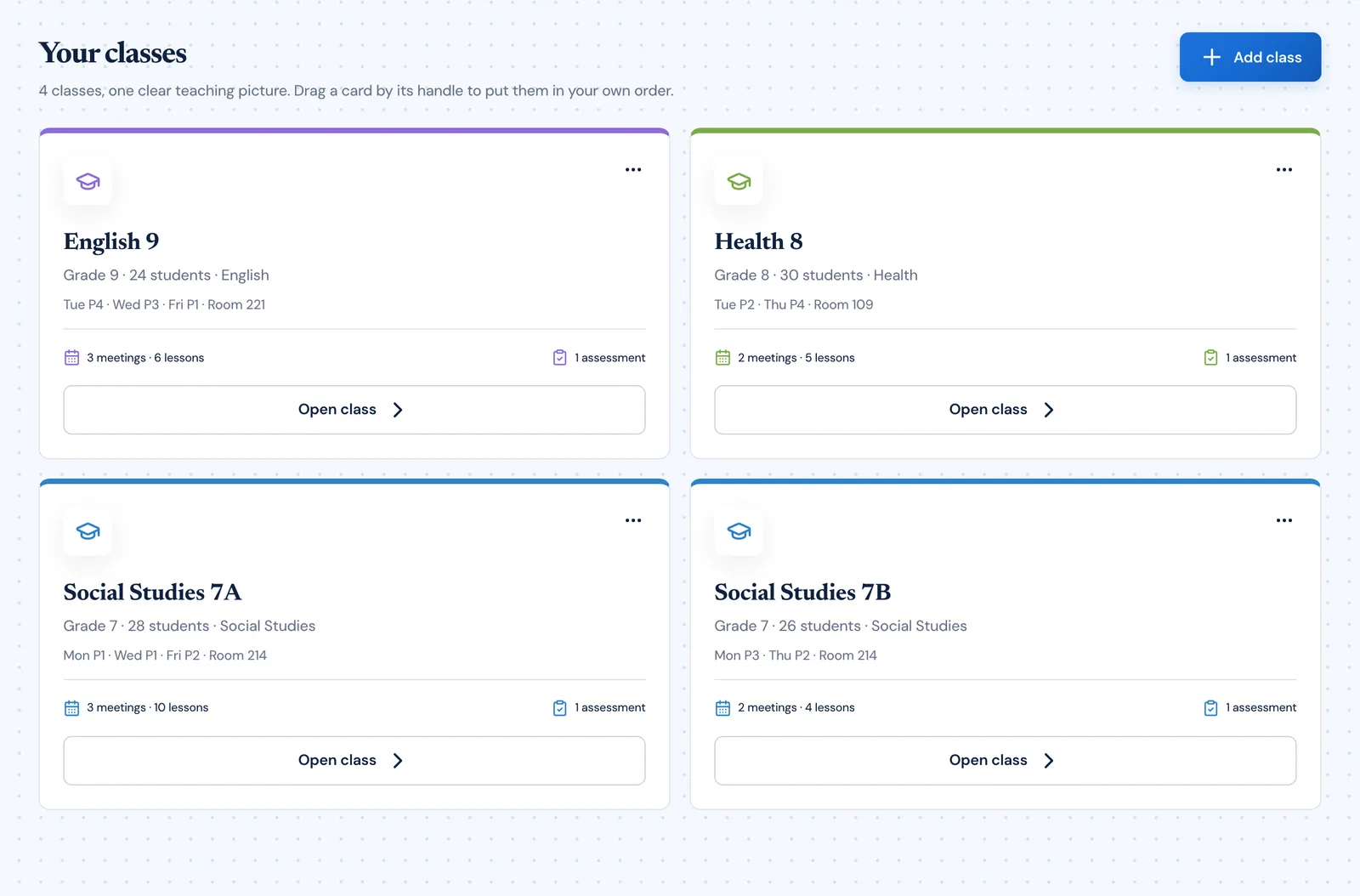
Classes are the spine of the planner: they decide which dates exist to plan on, and they colour everything else.

The PlanLark classes view showing four classes with their subjects, grades, meeting times and rooms
Class and meetings
A class holds its subject, grade, student count and each meeting — day, period, time and room.
Doubles and spans
A meeting can span consecutive periods.
Colour throughout
Each class carries its colour into Today, Week, Year and the class outline.
Reorder to taste
Drag classes into the order you think about them.
Everything hangs off it
Lessons, units, curriculum selections, tasks and notes all reference the class.
AI planning

Lark drafts. You decide.

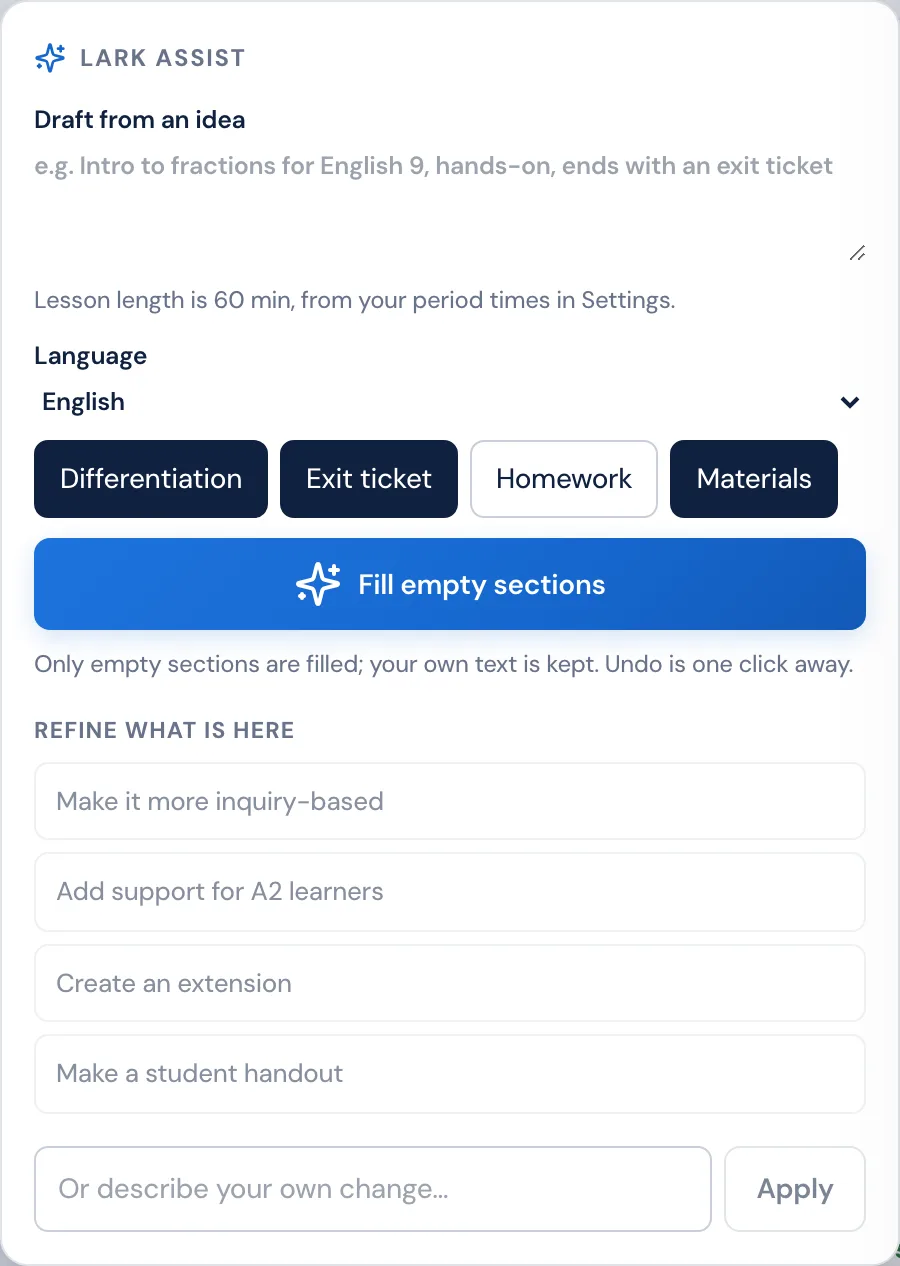
PlanLark’s AI lives in one place — the lesson editor — and does one job well: getting a blank section started, then helping you change what is there.

The Lark assist panel in the PlanLark lesson editor with a draft-from-an-idea box, language selector, inclusion toggles for differentiation, exit ticket, homework and materials, a Fill empty sections button, and four preset refinements
Draft from an idea
Describe the lesson in a sentence and Lark drafts it at the length of your period.
Fills only what is empty
Sections you have already written are never overwritten, and undo is one click.
Choose what to include
Ask for differentiation, an exit ticket, homework or materials.
Language options
Draft in English, at German A2 level, or bilingually.
Refine what is there
Make it more inquiry-based, add support for A2 learners, create an extension, make a student handout — or describe your own change.
Always editable
A draft is a starting point in your editor, not a finished plan you have to accept.
Plan by voice
Ask what you are teaching, then create, rename, move or copy a lesson, add a test or an assignment — out loud, on your real rotation — and undo it by saying so. Deleting asks first.

The Free plan includes 30 AI interactions a month. Pro and School lift the limit. See plans

Works on the days it has to

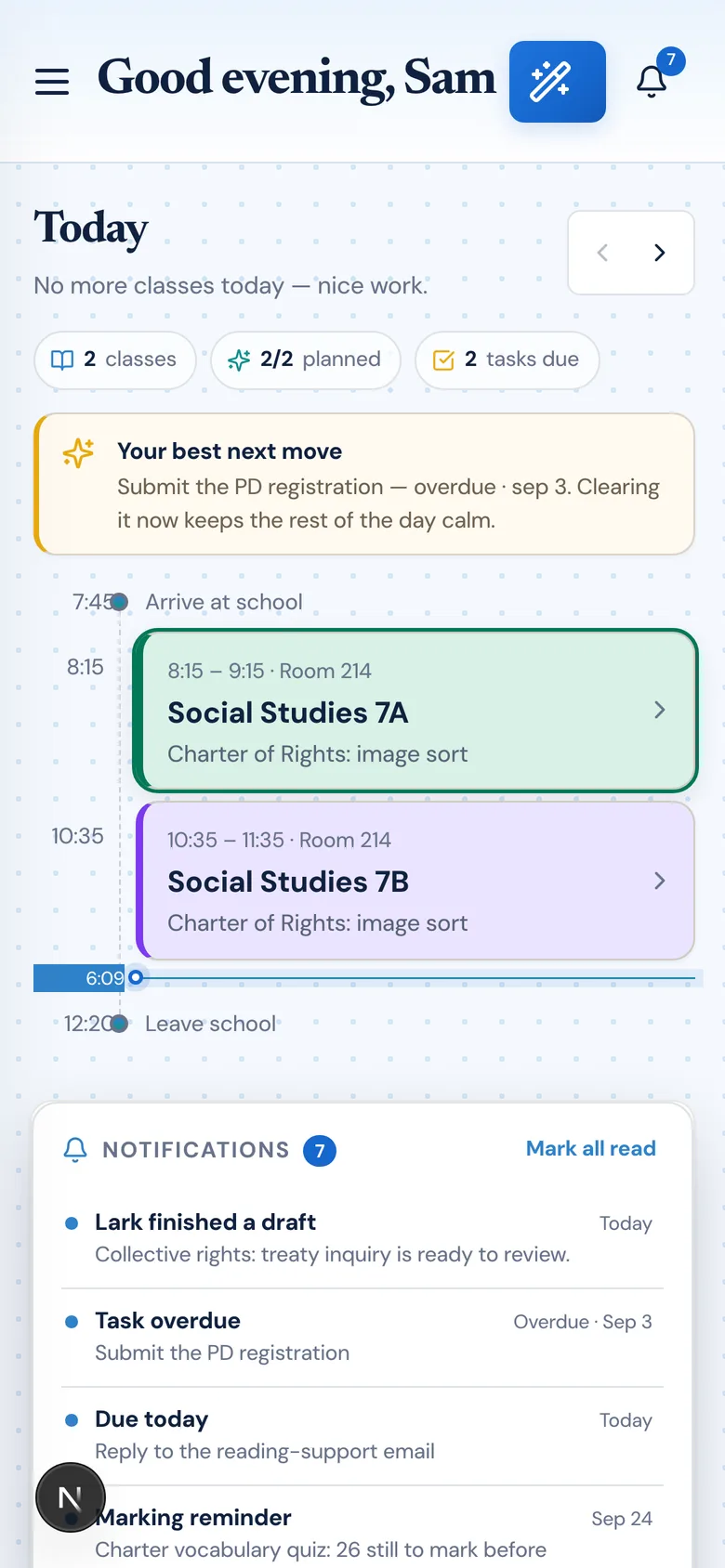
Planned on a laptop. Checked on a phone.

The planner is the same product on a phone as on a laptop — the day you are teaching, the plan for the class in front of you, and the task you just remembered.

PlanLark on a phone showing the Today view with the teaching day and the classes on it

Spend less time managing your planning.

PlanLark keeps your curriculum, lessons and planning work connected so you can focus on teaching.

Free plan for every teacher · no credit card required