

Voice planning on the go: turning quick notes into full lesson plans
If your best ideas show up on the walk from car to classroom or during bus duty, you’re not alone. The reality of K–12 teaching is that planning time is fragmented and scarce. In an April 4, 2024 report, Pew Research Center found that 84% of public school teachers say they don’t have enough time during regular work hours for tasks like lesson planning and grading. That’s the gap this guide aims to close—with a workflow that starts with your voice on a phone and ends in a teachable plan you can refine quickly. Pew Research Center link]. ([pewresearch.org)
This article shares a practical, low-friction method for “voice planning on the go” and shows how Planlark can turn a 30–60 second voice note into a complete, standards-aware lesson draft you can edit with confidence.
- Who it’s for: classroom teachers, department chairs, and instructional coaches
- What you’ll learn: a simple capture-to-plan workflow, AI prompts that work, and best practices to keep quality high and prep time low
- Tools you’ll use: your phone’s voice recorder, a Planlark workspace, and Planlark’s AI planning features
What we mean by “voice planning”
Voice planning means using short spoken notes (on a phone, watch, or laptop mic) to capture lesson intents, activities, or student misconceptions in the moment. Those snippets then become structured lesson components—objectives, materials, checks for understanding—without retyping from scratch.
Educators have been experimenting with voice assistants to streamline routine tasks like timers, transitions, and quick reminders—especially in primary grades. That same convenience can extend to planning if you have a system that translates snippets into structure. Apple Education Community link]. ([education.apple.com)
Why voice planning matters for busy teachers
- It fits real teacher time. Instead of waiting for a perfect 45-minute block, you bank micro-moments: after a hallway conference, while setting up lab materials, or right after class during the “what worked/what to tweak” window.
- It prevents idea loss. Great hooks, examples, and misconceptions fade quickly; speaking them out loud preserves the details you’ll want later.
- It reduces cognitive switching. Planning in short bursts reduces the mental load of context switching between instruction, supervision, and paperwork, so you can return later to a prepared draft rather than a blank page.
- It shortens the distance from field notes to teachable steps. Voice capture lets you start where the energy is—authentic observations of your students—then formalize with AI support.
Bottom line: teachers need lighter-weight capture and faster translation into plans. The data backs that urgency. Pew Research Center link]. ([pewresearch.org)
Capturing ideas with your phone and converting to plans
Here’s a classroom-tested workflow you can start today.
1) Set up a quick-capture routine on your phone
- Create a single “Lesson Ideas” folder in your voice memo app.
- Name each memo with date + unit + class section (e.g., “2026-03-12 Fractions 6B – Exit ticket idea”).
- Keep notes to 30–90 seconds. Short, focused memos convert more cleanly.
- Use a simple structure while speaking:
- Context: “Grade 6, fractions, comparing unlike denominators.”
- Goal: “Students will justify which fraction is larger using number lines.”
- Activity: “Partner sort, then gallery walk.”
- Evidence: “One-minute written justification.”
- Differentiation: “Visual supports; sentence frames.”
A sample voice prompt: “Tomorrow Grade 6 comparing unlike denominators with number lines. Start with a quick demo, then partner sort of fraction cards, then a gallery walk to debate choices. Evidence: a one-minute written justification using ‘because…’ sentence frame. Need: visual fraction strips for support; challenge set with improper fractions.”
2) Move the memo into Planlark’s voice planning
- Upload or dictate your memo directly into Planlark’s voice capture to create a draft lesson card in seconds. From there, you can expand, reorder, or tag components. See how it works on the Voice Planning page: Planlark Voice Planning.
3) Let AI turn your notes into a first draft
- In Planlark, switch to the AI assistant and choose “Expand from notes.” The AI will parse your context, goal, and activity into structured sections (objectives, materials, procedures, differentiation, checks for understanding, timing) and keep your original language intact where it matters. Explore examples on AI Lesson Planning.
4) Tweak for your students and constraints
- Adjust timing to match your bell schedule.
- Swap materials for what you actually have.
- Add supports for specific students (504/IEP accommodations, multilingual learners, enrichment options).
5) File, calendar, and share
- Add standards tags and unit alignment.
- Place the lesson on your weekly calendar, attach handouts, and share the plan with your PLC or coach.
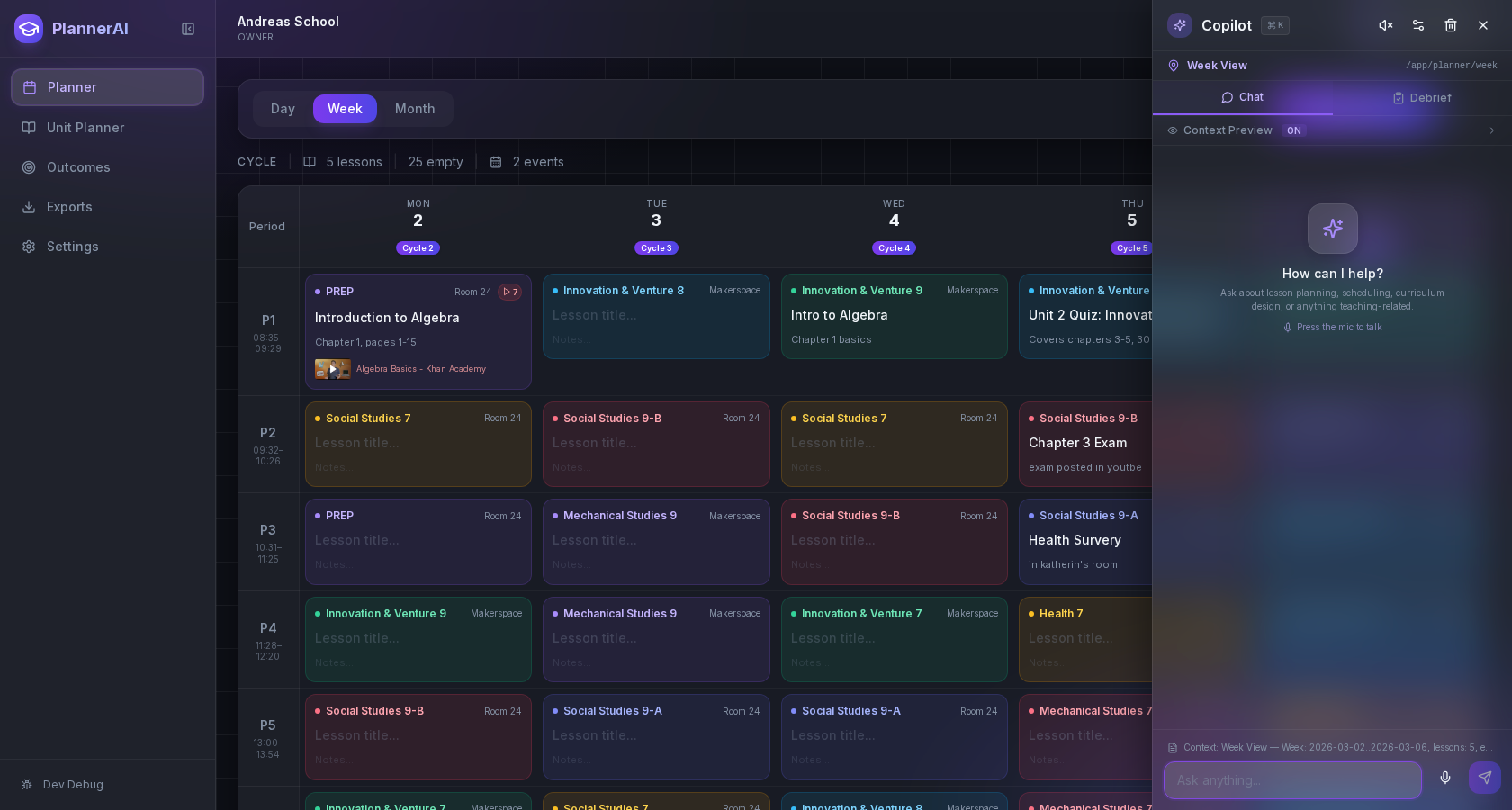
Integrating AI to turn notes into ready-to-teach plans
AI can save time and improve clarity, but it should serve you—not the other way around. The U.S. Department of Education’s Office of Educational Technology advises schools to use AI to augment educator work, keep a “human in the loop,” and attend to privacy, security, and bias. Those principles map directly onto lesson planning: you set the intent; AI drafts; you review and adapt. U.S. Department of Education report]. ([ed.gov)
Here are reliable ways to use AI inside Planlark without losing your professional judgment:
- Summarize and scaffold from your voice memo. Convert raw ideas into a three-part lesson sequence: “Launch – Learn – Land.”
- Generate leveled checks for understanding. Ask AI to write one quick CFU at recall, one at application, and one at reasoning—with success criteria in student-friendly language.
- Draft differentiation menus. Provide your class profile (e.g., “2 newcomers, 3 students working below grade level in reading, 5 need enrichment”) and ask for choices that respect that mix.
- Build exemplar responses. Have AI produce 1–2 sample explanations for a key prompt to calibrate expectations.
- Turn reflections into revisions. After teaching, dictate what worked and what didn’t. Ask AI to propose a V2 for next time, capturing your tacit knowledge while it’s fresh.
These uses keep the teacher at the center while offloading tedious drafting. That balance—efficiency with educator control—is exactly what federal guidance encourages. U.S. Department of Education report]. ([ed.gov)
A quick prompt kit for better outputs
Use these copy/paste starters inside Planlark after you upload a voice memo:
- “Turn my note into a lesson outline with: Learning Goal (I can…), Materials, Launch (5–8 minutes), Guided Practice (15–20), Independent Practice (15), CFU (3 prompts), and Exit Ticket. Keep my examples; add time estimates.”
- “Differentiate this plan for: 1) newcomers (visuals, translated word bank), 2) students who need more practice (guided sentence frames), 3) students ready to extend (open-ended challenge).”
- “Write two model explanations for the exit ticket prompt at ‘meets’ and ‘exceeds’ levels.”
- “Propose a lighter materials list using only what’s in a typical classroom.”
Best practices for successful voice planning
The capture-to-plan workflow works best when you make a few choices up front.
1) Speak in structures AI understands
Use the same micro-structure every time you record: Context → Goal → Activity → Evidence → Differentiation. That gives AI clear anchors to expand.
2) Anchor to learning goals first, then activities
Speak your success criteria up front (“Students can explain why 5/8 > 1/2 using a number line”). Activities follow from goals; not the other way around.
3) Keep your voice; use AI for scaffolding
Let AI help with formatting, timing, and options, but keep the hooks, examples, and language that came from your classroom. This preserves relevance and authenticity for your students.
4) Guardrails: accuracy, bias, privacy
- Always review AI output for accuracy, age appropriateness, and cultural responsiveness.
- Remove or anonymize student data from voice notes before using AI features.
- Consult trustworthy guidance as your district builds policies. Common Sense Media’s recent guidance emphasizes training, oversight, and thoughtful integration so AI enhances teaching without compromising safety or quality. Common Sense Media white paper]. ([commonsensemedia.org)
5) Build a 10-minute end-of-day habit
Voice planning is even more effective when paired with a brief daily debrief. Capture one insight, one misconception, and one improvement for tomorrow. Over a week, those 10-minute reflections compound into stronger units. If you want a structured place to do this alongside your plans, explore Planlark’s features page for how components work together: Planlark Features.
6) Make room for accessibility and student voice
When you narrate your plan, include access supports you’ll need—captions for videos, alt text for visuals, and flexible response options. Educators have reported practical benefits from voice-activated tools in primary classrooms for timing, transitions, and quick supports; that same accessibility mindset pays off in planning too. Apple Education Community link]. ([education.apple.com)
A concrete example: from 45-second memo to teachable plan
Below is a realistic Grade 7 ELA example using the capture-to-plan workflow.
1) Voice memo (45 seconds) “Tomorrow 7th ELA. Aim: identify and analyze how an author develops a central idea. Text: ‘Teen Brains and Risk.’ Launch with a 2-minute think-pair-share on ‘What makes a risk worth it?’ Guided practice: annotate first two paragraphs for claim/evidence. Independent: small groups find two pieces of evidence and explain how they support the central idea. CFU: cold-call two groups to share reasoning. Exit ticket: one-sentence summary of central idea with evidence. Differentiation: sentence stems and evidence bank for support; extension—find a counterexample.”
2) Planlark AI expands it
- Objectives: “I can identify a central idea and explain how evidence supports it.”
- Materials: copies of article; annotation tools; stems: “The author claims…,” “This shows… because…”
- Launch (5): partner prompt, collect 2–3 responses.
- Guided Practice (12): annotate paragraph 1–2 under doc cam; model reasoning.
- Independent (18): small groups; assign roles; collect evidence; post-it share.
- CFU (5): select two groups; probe for warranting language.
- Exit Ticket (5): single-sentence CER.
- Differentiation: supports and extensions as noted.
3) You polish in 5 minutes
- Swap the article for a district-approved text on decision-making.
- Add an anchor chart for “claim/evidence/reasoning.”
- Adjust timing for Wednesday’s shortened block.
Result: a teachable plan aligned to your context—without typing it all from scratch.
How Planlark makes voice-first planning work
- Fast capture: Upload or dictate short voice notes from your phone and watch them appear as plan cards you can tag and schedule. Try it: Planlark Voice Planning.
- AI that respects your intent: Generate full lesson drafts that preserve your “teacher voice,” then edit inline with suggestions from the AI planning workspace. See details: AI Lesson Planning.
- Calendar and unit views: Drag plans onto your week and unit maps, attach handouts, and track what you’ve actually taught versus what you planned.
- Reflection loop: Pair end-of-day voice reflections with quick revisions so each lesson improves the next time you teach it.
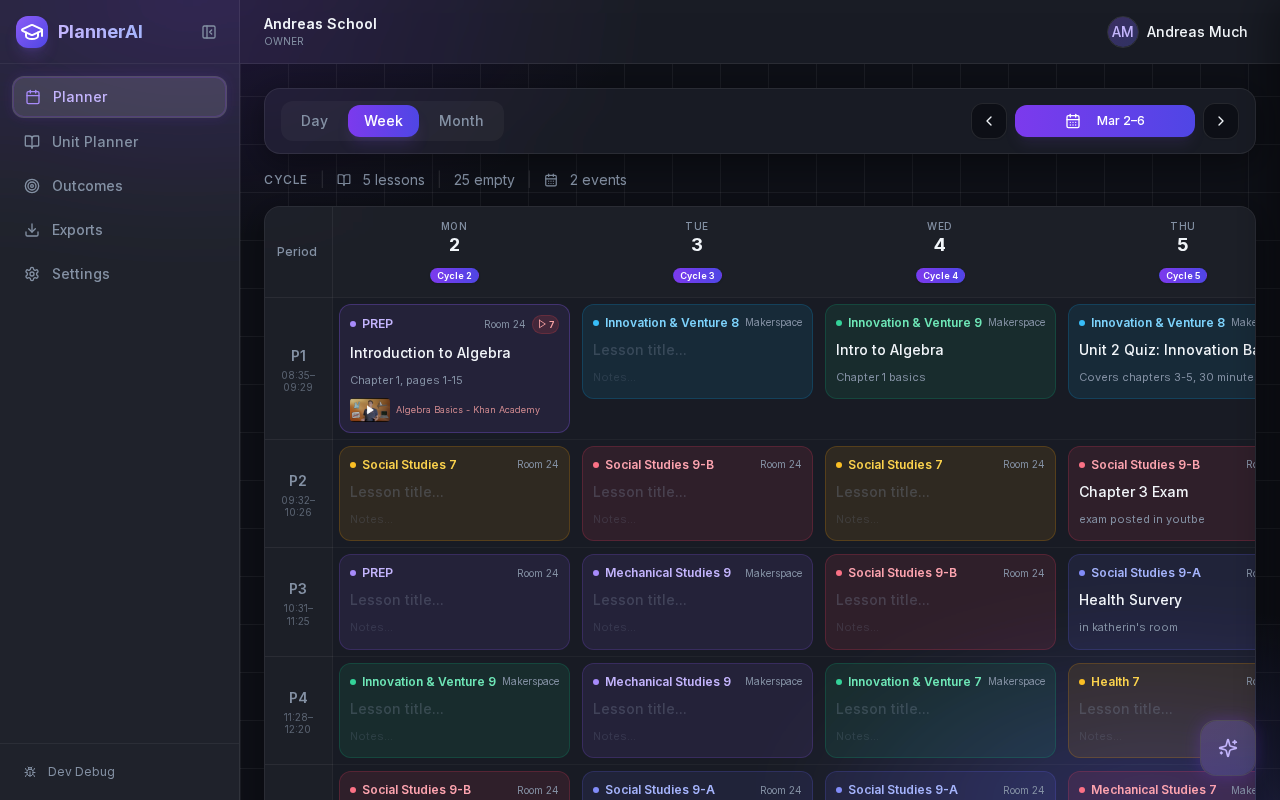
Quality, ethics, and your professional judgment
Responsible AI use in planning relies on three habits:
1) Be explicit about objectives and constraints. Your voice memo should include the success criteria, timing, and known student needs so AI expands in the right direction.
2) Verify and adapt. Treat AI output as a first draft and apply your expertise—especially for sensitive content and diverse learners. That aligns with federal guidance to keep humans in the loop and attend to safety, privacy, and bias. U.S. Department of Education report]. ([ed.gov)
3) Keep learning. External groups are publishing helpful guidance for schools and districts on safe, effective AI use that centers teacher voice and student well-being. For example, Common Sense Media’s 2024 white paper highlights the need for training and oversight as districts adopt AI supports. Common Sense Media white paper]. ([commonsensemedia.org)
Getting started with Planlark: features and pricing
If you’re ready to try voice planning teachers on the go, here’s the simplest path:
1) Record your next idea as a 30–60 second memo. 2) Import it into Planlark and click “Expand from notes.” 3) Review and polish in 5 minutes; tag standards and add materials. 4) Drop it on your calendar and you’re done.
Explore what’s included on the feature pages:
- Voice capture and quick-start workflow: Planlark Voice Planning
- AI-assisted lesson authoring: AI Lesson Planning
- Compare plans and choose a tier: Pricing
- Browse how features fit together: Features Overview
Final thoughts and a quick CTA
Your ideas are your most valuable planning asset. Voice-first capture lets you seize them when and where they happen—and Planlark turns them into structured, teachable lessons you can trust. Start today: record one idea on your phone, drop it into Planlark, and let AI do the heavy lifting while you stay in control of quality.
- Try voice-first planning now: Planlark Voice Planning
- Build full lessons fast with AI: AI Lesson Planning
- See plans and pricing: Pricing
- Or learn more about the platform: Planlark Homepage
Practical, specific, and teacher-led—that’s how voice planning on the go becomes time you can give back to students, without sacrificing quality.
---
References for further reading
- Pew Research Center, “How teachers manage their workload” (April 4, 2024). Pew Research Center link]. ([pewresearch.org)
- U.S. Department of Education, Office of Educational Technology, “Artificial Intelligence and the Future of Teaching and Learning: Insights and Recommendations” (May 2023). U.S. Department of Education report]. ([ed.gov)
- Apple Education Community, “Unleashing the Power of Virtual Assistance in Primary Classrooms” (Aug. 2, 2023). Apple Education Community link]. ([education.apple.com)
- Common Sense Media, “Generative AI in K–12 Education” white paper (Updated Aug. 2024). Common Sense Media white paper]. ([commonsensemedia.org)

